ONE PHOTO. A DIFFERENT POSSIBILITY.
Turn your photo into graffiti-style art
A photo-to-graffiti effect restyles your image with the colors, lines and paint textures of street art. In DoodleMe for iPhone, select the Graffiti Comic look, choose a photo and generate a still image to save or share.
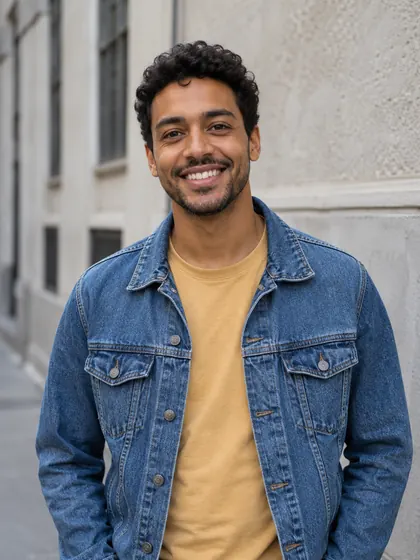
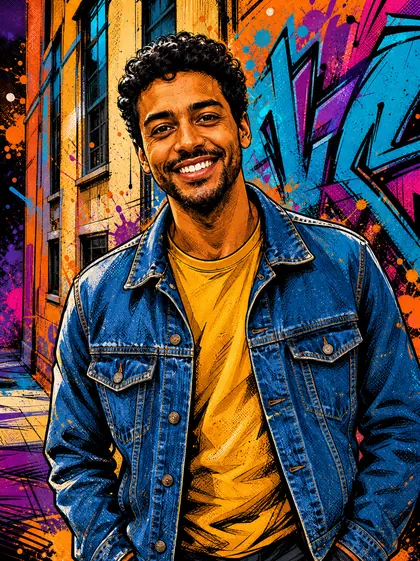
The source depicts an AI-generated fictional adult. We applied the existing Graffiti Comic look to this source to create the result. The treatment changes the subject and background together, with bold outlines and paint-like texture. Results vary.
Made for iPhone. Try 2 image generations free. A subscription is required after the two free results. The allowance is two successful free results total across all looks. Results vary.
After installation, select Graffiti Comic inside the app.
A street-art treatment for the whole image
In this example, the smile, curly hair, denim jacket and ochre shirt remain recognizable. The building's windows also carry through into the artwork. Strong outlines, orange highlights, turquoise and purple shapes, speckles and paint-like splashes restyle the person and setting.
The background changes along with the portrait. Graffiti Comic is the name of this look in the app; its purpose here is a graffiti-inspired still image. It does not create comic-book panels, a story or a physical mural.
How to try Graffiti Comic
- Install DoodleMe on your iPhone from the App Store and open the app.
- Select Graffiti Comic from the available looks. Review and accept the photo-processing consent if it is shown before the photo picker opens.
- Choose one photo from your library. Generation starts automatically after you select it.
- Use Save or Share on the result screen to keep your image or share the new look.
Start with a subject that stands out
A clear portrait with a visible face gives the look a strong focal point. Good light and a simple background make the starting image easier to read, although the generated surroundings can still change. Use a photo you have permission to process.
Look at the example for the kind of treatment to expect, rather than an exact palette to copy. Colors, textures, background shapes and likeness can vary between results.
Questions before you try it
Can I add graffiti only to the background?
This look transforms the image as a whole. It does not provide a background-only selection or a brush for protecting particular parts of the photo.
Can I turn my name into graffiti lettering?
Graffiti Comic starts from a photo and creates a street-art-inspired image. It has no name or lettering input, and readable custom words are not guaranteed.
Can I control stencils or order a mural?
The template chooses the creative treatment. There are no stencil controls, mural orders or physical products in this flow. You receive one digital still image.
Can I try it free and save the result?
DoodleMe includes two successful free results total across its looks, then requires a subscription for more generations. The allowance is not daily and is not a subscription free trial. Use Save or Share on the result screen.
How your photo is processed
Your selected photo is processed off-device by a third-party AI provider to create your result. See our Privacy Policy for details. Read the Privacy Policy.
Explore another photo idea
YOUR PHOTO. YOUR NEXT LOOK.
Ready to try Graffiti Comic?
Try Graffiti Comic in DoodleMeOpen DoodleMe on your iPhone and select Graffiti Comic to begin.