ONE PHOTO. A DIFFERENT POSSIBILITY.
Turn your photo into a playful caricature
To turn a photo into a caricature in DoodleMe for iPhone, select Big Head Caricature, choose your photo and generate an image. This look gives people oversized heads and playful proportions, with an illustrated finish you can save or share.
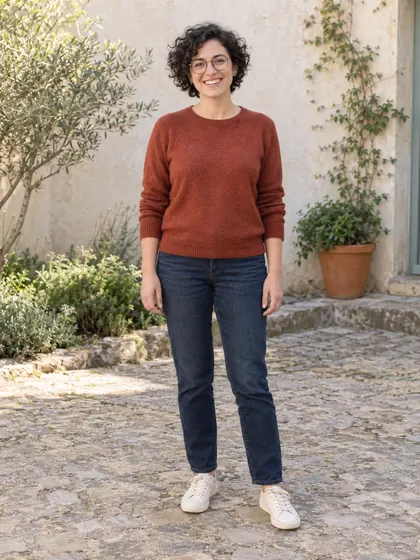
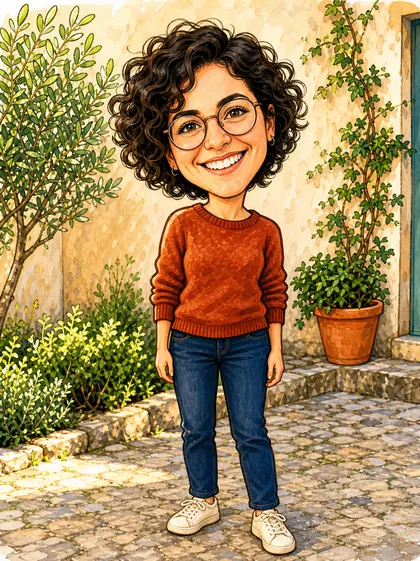
The source depicts an AI-generated fictional adult. We applied the existing Big Head Caricature look to this source to create the result. The AI interprets the person and scene with playful proportions; results vary.
Made for iPhone. Try 2 image generations free. A subscription is required after the two free results. The allowance is two successful free results total across all looks. Results vary.
After installation, select Big Head Caricature inside the app.
What makes this a caricature?
The enlarged head and compact body are the clearest changes in this example. Curly hair, round glasses, a smile and the rust-red sweater connect the result to the source, while drawn outlines and warm color turn the leafy courtyard into an illustration.
The result also reimagines the framing and surrounding detail. A photo-to-caricature transformation can exaggerate features and invent parts of the composition. Exact likeness, identical clothing details and a particular expression are not guaranteed.
How to try Big Head Caricature
- Install DoodleMe on your iPhone from the App Store and open the app.
- Choose Big Head Caricature from the available looks. Review and accept the photo-processing consent if it is shown before the photo picker opens.
- Choose one photo from your library. Generation starts automatically after you select it.
- Use Save or Share on the result screen to keep your image or send it to friends.
Give the caricature a clear starting point
Choose a photo with a visible face, a clear expression and enough light to see the features. A very distant face or strong blur leaves fewer details for the transformation. Start with a photo you have permission to process.
An everyday portrait is enough to try the look. This example starts with a full-length view and keeps recognizable clothing and courtyard details. Selecting the template does not let you order specific job props or a custom composition. Expect playful variation in the finished image.
Questions before you try it
Can I try a photo-to-caricature result for free?
DoodleMe includes two successful free results total across its looks, followed by a required subscription for more generations. These are not daily free results or a subscription free trial.
Do I need to write a prompt?
No. Choose Big Head Caricature and your photo. The selected look supplies the creative direction for the AI.
Is this a hand-drawn caricature commission?
The app generates a digital image with AI. It does not commission an artist, offer a custom drawing service or include physical prints.
Can I save and share the caricature?
Yes. The result screen has Save and Share controls. Each generation produces one image, and the appearance can differ from the example.
How your photo is processed
Your selected photo is processed off-device by a third-party AI provider to create your result. See our Privacy Policy for details. Read the Privacy Policy.
Explore another photo idea
YOUR PHOTO. YOUR NEXT LOOK.
Ready to try Big Head Caricature?
Try Big Head Caricature in DoodleMeOpen DoodleMe on your iPhone and select Big Head Caricature to begin.